Table of Contents
- Introduction
- What is Techncal SEO?
- Why Technical SEO Matters?
- Difference Between Technical SEO vs On-Page vs Off-Page SEO
- 20 Most Important Technical SEO Ranking Factors
- Steps to conduct a Technical SEO Audit
- Conclusion
- FAQs
Introduction
Think of your website as a house. Your content is the furniture, decor, and personality but technical SEO is the foundation, plumbing, and wiring. If that part isn’t solid, nothing else works.
The good news is you don’t need to be an engineer to get technical SEO right. With the right knowledge and tools, you can tackle most issues yourself. In this guide, we’ll break down the 20 most important technical SEO ranking factors that search engines consider. You’ll learn what each factor means, why it matters, how to optimize it, and which tools to use—plus simple next steps you can take today.
What is Technical SEO?
Technical SEO refers to the behind-the-scenes optimizations that enable search engines to crawl, understand, and index your website effectively.
If you think of SEO like building a house:
- Content is the furniture.
- Backlinks are the recommendations from neighbors.
- Technical SEO is the foundation, plumbing, and wiring.
Without it, the house won’t stand.
Technical SEO covers:
- Site speed
- Mobile-friendliness
- Structured data
- Crawlability and indexability
- Security (HTTPS)
- Duplicate content control
In short, it’s the work that ensures search engines can actually find and trust your site.
Why Technical SEO Matters?
Here’s the thing: you could publish a perfect blog post, but if your site is slow, insecure, or uncrawlable, Google won’t even show it.
Why it’s important:
- Search Visibility: Google only ranks what it can crawl and index.
- User Experience: Fast, secure, mobile-friendly sites keep visitors around longer.
- Trust & Conversions: A technically sound site feels safe and reliable.
- Competitive Edge: Many businesses still ignore technical SEO—nailing it gives you a clear advantage.
Example: Imagine two online stores with identical products. The first loads in one second, is mobile-friendly, and uses HTTPS. The second loads in eight seconds, has broken links, and lacks an SSL certificate. Guess which one Google ranks higher?
Difference Between Technical SEO vs On-Page vs Off-Page SEO
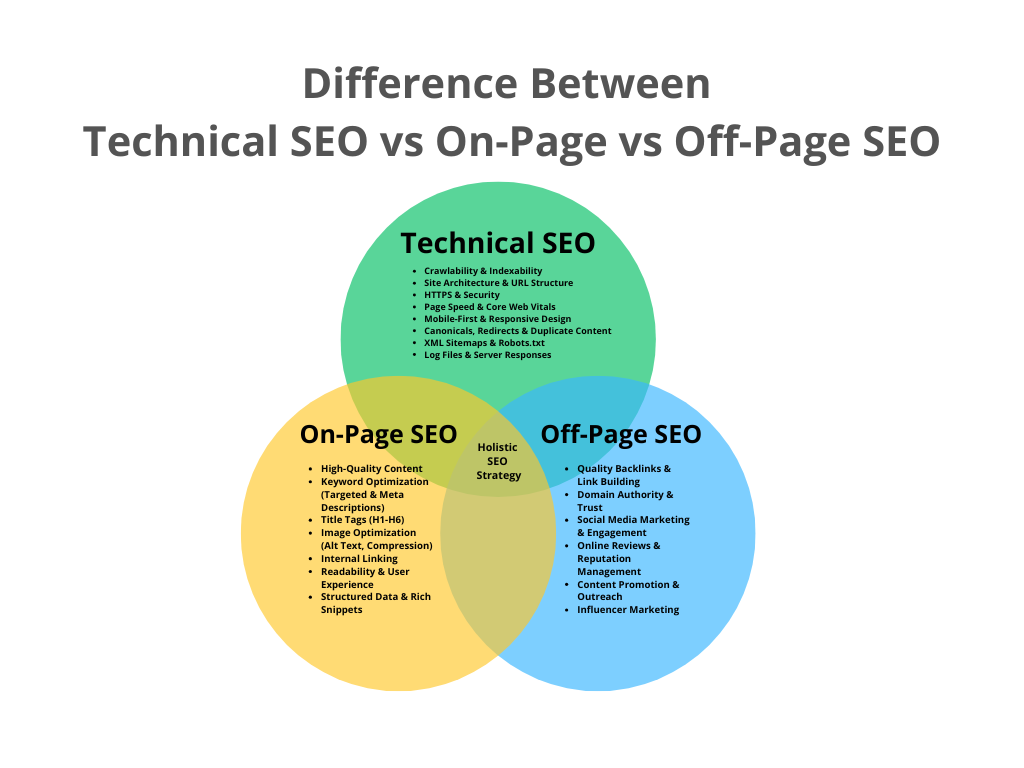
It’s easy to mix these up, so let’s break it down simply:
- Technical SEO = Back-end setup that ensures your site can be crawled, indexed, and delivered properly.
Examples: site speed, HTTPS, mobile-friendliness, crawlability. - On-Page SEO = Optimizations on the page itself to make content relevant and clear.
Examples: keyword placement, meta titles, headings, internal links. - Off-Page SEO = External signals that boost your site’s authority.
Examples: backlinks, social shares, brand mentions.
Think of it like this:
- Technical SEO is the foundation and plumbing.
- On-Page SEO is the furniture and layout.
- Off-Page SEO is the reputation and word of mouth.
All three work together—skip one, and the whole system weakens.
20 Most Important Technical SEO Ranking Factors
So far, we’ve covered what technical SEO is, why it matters, and how it differs from on-page and off-page optimization. Now, let’s get practical.
Search engines consider dozens of signals when deciding how to rank your site, but some are absolutely critical—the ones that form the backbone of a healthy, visible website. These are the 20 technical SEO ranking factors you should prioritize first.
Think of this list as your roadmap: address these, and you’ll cover 80% of what actually moves the needle in technical SEO.
1. Website Crawlability
- What it is: Search engines send crawlers (bots) to discover your web pages. If they can’t crawl your site, you won’t show up in search results.
- Why it matters: Crawlability is the first step in SEO. No crawl = no indexing = no traffic.
- How to fix it:
- Make sure your site is linked internally.
- Avoid orphan pages (pages with no links pointing to them).
- Use a flat site structure (important pages within 3 clicks from the homepage).
- Make sure your site is linked internally.
- Tools: Screaming Frog, Ahrefs Site Audit, Google Search Console (Coverage Report).
- Quick CTA: Run a free crawl with Screaming Frog and see if all your important pages are accessible.
2. Proper Indexing
- What it is: Even if your pages are crawled, they need to be added to Google’s index to appear in search.
- Why it matters: Indexation is what makes your content “eligible” to rank.
- How to fix it:
- Check if your important pages are indexed: site:yourdomain.com in Google.
- Use noindex tags only for pages you truly don’t want indexed.
- Submit updated XML sitemaps.
- Check if your important pages are indexed: site:yourdomain.com in Google.
- Tools: Google Search Console (URL Inspection tool).
- Quick CTA: Enter a key page URL in GSC → Inspect → Request Indexing.
3. HTTPS & Security
- What it is: A secure website uses HTTPS instead of HTTP.
- Why it matters: Google confirmed HTTPS as a ranking factor. Plus, users trust secure sites more.
- How to fix it:
- Get an SSL certificate (most hosting providers offer it free via Let’s Encrypt).
- Redirect all HTTP traffic to HTTPS.
- Get an SSL certificate (most hosting providers offer it free via Let’s Encrypt).
- Tools: WhyNoPadlock.com, SSL Checker.
- Quick CTA: If your site still shows “Not Secure,” ask your hosting provider to enable SSL—takes 5 minutes.
4. Mobile-Friendliness (Mobile-First Indexing)
- What it is: Google primarily uses the mobile version of your site for indexing and ranking.
- Why it matters: More than half of traffic is mobile. If your site doesn’t work on phones, you’re invisible.
- How to fix it:
- Use responsive design.
- Avoid popups or layouts that break on smaller screens.
- Test buttons and fonts for readability.
- Use responsive design.
- Tools: Google’s Mobile-Friendly Test, PageSpeed Insights.
- Quick CTA: Test your homepage in Google’s Mobile-Friendly Test right now.
5. XML Sitemap Optimization
- What it is: A roadmap file that tells search engines where your pages are.
- Why it matters: Helps crawlers find your pages faster and prioritize important content.
- How to fix it:
- Include only index-worthy pages.
- Keep it clean—no broken or duplicate URLs.
- Submit it in Google Search Console.
- Include only index-worthy pages.
- Tools: Yoast SEO (for WordPress), Screaming Frog XML Sitemap Generator.
- Quick CTA: Open your sitemap (usually yourdomain.com/sitemap.xml)—check if it’s clean.
6. Robots.txt Configuration
- What it is: A file that tells search engines which pages they can/can’t crawl.
- Why it matters: Mistakes here can block your whole site.
- How to fix it:
- Make sure you’re not accidentally blocking important sections.
- Allow CSS and JavaScript files to be crawled.
- Make sure you’re not accidentally blocking important sections.
- Tools: Google Search Console → robots.txt Tester.
- Quick CTA: Open yourdomain.com/robots.txt—look for “Disallow: /”. If you see it, fix it ASAP.
Performance & User Experience
7. Page Speed Optimization
- What it is: How fast your pages load.
- Why it matters: Slow sites hurt rankings and frustrate users.
- How to fix it:
- Compress images.
- Use caching.
- Minify CSS/JS.
- Compress images.
- Tools: Google PageSpeed Insights, GTmetrix.
- Quick CTA: Run your homepage through PageSpeed Insights—fix one red issue today.
8. Core Web Vitals (LCP, FID, CLS)
- What it is: Google’s metrics for page experience:
- LCP: Largest Contentful Paint (loading speed)
- FID: First Input Delay (interactivity)
- CLS: Cumulative Layout Shift (visual stability)
- LCP: Largest Contentful Paint (loading speed)
- Why it matters: Direct ranking signal since 2021.
- How to fix it:
- Optimize images/videos.
- Reduce third-party scripts.
- Use stable layouts.
- Optimize images/videos.
- Tools: Google Search Console → Core Web Vitals report, Lighthouse.
- Quick CTA: Open your Core Web Vitals report in GSC—fix the “Poor” pages first.
9. Clean URL Structure
- What it is: Short, descriptive URLs with keywords.
- Why it matters: Easier for search engines and users to understand.
- How to fix it:
- Use hyphens instead of underscores.
- Avoid random numbers/parameters when possible.
- Use hyphens instead of underscores.
- Tools: Screaming Frog (URL audit).
- Quick CTA: Pick one messy URL and rewrite it into a clean, keyword-rich format.
10. Duplicate Content & Canonical Tags
- What it is: When the same content appears in multiple places.
- Why it matters: Splits ranking signals and confuses Google.
- How to fix it:
- Use canonical tags to tell Google the “main” version of a page.
- Avoid publishing identical content across subdomains.
- Use canonical tags to tell Google the “main” version of a page.
- Tools: Siteliner, Ahrefs Site Audit.
- Quick CTA: Check your site in Siteliner—see if Duplicate content is dragging you down.
11. Site Architecture & Internal Linking
- What it is: How your site’s pages connect to each other.
- Why it matters: Helps crawlers discover content and passes link equity.
- How to fix it:
- Use logical categories.
- Link to related articles/pages.
- Avoid deep page nesting.
- Use logical categories.
- Tools: Screaming Frog (Crawl Depth report).
- Quick CTA: Add 3 internal links to your top blog post today.
12. Structured Data / Schema Markup
- What it is: Code that helps search engines understand your content.
- Why it matters: Enables rich results (stars, FAQs, product info).
- How to fix it:
- Use JSON-LD schema markup.
- Add schema for products, reviews, articles.
- Use JSON-LD schema markup.
- Tools: Google’s Rich Results Test, Schema.org.
- Quick CTA: Test your homepage in Rich Results Test—add schema if missing.
Content Delivery & Technical Setup
13. Server Response Codes
- What it is: Status codes your server sends (200 = OK, 301 = Redirect, 404 = Not Found).
- Why it matters: Errors waste crawl budget and hurt user experience.
- How to fix it:
- Fix broken links (404s).
- Use 301 redirects for moved pages.
- Fix broken links (404s).
- Tools: Screaming Frog (Response Codes report).
- Quick CTA: Run a crawl—fix one broken link today.
14. Use of CDN (Content Delivery Network)
- What it is: A CDN stores copies of your site on servers worldwide.
- Why it matters: Speeds up loading for users everywhere.
- How to fix it:
- Use free CDNs like Cloudflare.
- Enable caching + compression.
- Use free CDNs like Cloudflare.
- Tools: Cloudflare, KeyCDN.
- Quick CTA: Sign up for Cloudflare’s free plan—it’s one of the fastest wins in SEO.
15. Image Optimization
- What it is: Ensuring images load fast and are SEO-friendly.
- Why it matters: Images are often the heaviest part of a page.
- How to fix it:
- Use WebP or AVIF formats.
- Add descriptive alt text.
- Compress without losing quality.
- Use WebP or AVIF formats.
- Tools: TinyPNG, ShortPixel.
- Quick CTA: Optimize your homepage’s hero image today—cut file size in half.
16. JavaScript SEO
- What it is: Making sure search engines can render and index JavaScript-heavy content.
- Why it matters: Sites built on React, Angular, etc., can break if not configured right.
- How to fix it:
- Use server-side rendering (SSR) or dynamic rendering.
- Check if Googlebot sees the same content as users.
- Use server-side rendering (SSR) or dynamic rendering.
- Tools: Google Search Console → URL Inspection, Puppeteer.
- Quick CTA: Inspect a JavaScript-heavy page in GSC—compare rendered vs. raw HTML.
17. Hreflang for Multilingual Sites
- What it is: An attribute that tells Google which language version to show.
- Why it matters: Prevents duplicate content issues for multilingual websites.
- How to fix it:
- Add hreflang tags in your page headers or sitemaps.
- Match language and regional codes properly (e.g., en-us, fr-fr).
- Add hreflang tags in your page headers or sitemaps.
- Tools: Hreflang Tags Generator, Ahrefs Site Audit.
- Quick CTA: If you serve multiple languages, generate and add hreflang tags today.
Advanced / Modern Factors
18. AI & Machine Learning Signals
- What it is: Google uses AI (like RankBrain, BERT) to interpret search intent.
- Why it matters: Pages must be optimized for meaning, not just keywords.
- How to fix it:
- Write clear, user-focused content.
- Use natural language, answer questions.
- Write clear, user-focused content.
- Tools: AlsoAsked.com, AnswerThePublic.
- Quick CTA: Add one FAQ to your best article today—cover what users actually ask.
19. Log File Analysis
- What it is: Reviewing server logs to see how search engines crawl your site.
- Why it matters: Shows which pages Googlebot prioritizes (or struggles with).
- How to fix it:
- Identify crawl waste.
- Make sure bots crawl your most important pages.
- Identify crawl waste.
- Tools: Screaming Frog Log File Analyzer, Botify.
- Quick CTA: If you have access, review logs—spot one pattern of wasted crawls.
20. Website Security Beyond HTTPS
- What it is: Extra steps to protect users (malware, spam, DDoS).
- Why it matters: Security issues can lead to penalties or warnings in search results.
- How to fix it:
- Keep CMS/plugins updated.
- Use firewalls and anti-malware scans.
- Keep CMS/plugins updated.
- Tools: Sucuri SiteCheck, Cloudflare Security.
- Quick CTA: Run a free malware scan on your site today.
Steps to conduct a Technical SEO Audit
A technical SEO audit is like a comprehensive health check-up for your site. Here’s a step-by-step process beginners can follow:
- Check Crawlability
- Use Screaming Frog or GSC to see if all important pages are accessible.
- Verify Indexing Status
- Use site:yourdomain.com in Google and compare against your sitemap.
- Review HTTPS & Security
- Confirm SSL is active and no mixed content issues exist.
- Test Mobile-Friendliness
- Run your site through Google’s Mobile-Friendly Test.
- Analyze Page Speed & Core Web Vitals
- Use PageSpeed Insights → prioritize “Poor” pages first.
- Check for Duplicate Content
- Run Siteliner or Ahrefs audit → fix with canonical tags.
- Inspect Robots.txt & Sitemap
- Ensure important pages aren’t blocked, sitemap is clean.
- Look at Internal Linking & Site Structure
- Key pages should be 3 clicks from the homepage.
- Validate Structured Data
- Test with Google’s Rich Results Tool.
- Fix Broken Links & Errors
- Scan for 404s, 301 chains, or 500 errors.
- Scan for 404s, 301 chains, or 500 errors.
Pro tip: Run a crawl with Screaming Frog or SEMrush Site Audit. These tools will flag 80% of issues automatically.
Conclusion: Take Action Today
Technical SEO might sound intimidating, but it’s really just about ensuring your site works well for both users and search engines. Start small—pick one or two factors from this list and address them today. Over time, these optimizations stack up, making your site faster, more secure, and more visible.
Bookmark this guide, come back to it often, and tackle each ranking factor step by step. The sooner you start, the sooner you’ll see results.
FAQS
Q: What is the factor in technical SEO?
A: Technical SEO factors include crawlability, indexing, site speed, mobile-friendliness, structured data, and secure connections (HTTPS). These ensure search engines can properly access and understand your site.
Q: What are the ranking factors of SEO?
A: Ranking factors include high-quality content, backlinks, technical SEO (speed, crawlability, security), user experience, and on-page optimization (titles, meta tags, keywords). All work together to influence visibility.
Q: What are four major types of factors involved in SEO?
A: The four main groups are:
- Technical SEO: site infrastructure, crawling, indexing.
- On-page SEO: content and HTML elements.
- Off-page SEO: backlinks and authority signals.
- User experience signals: Core Web Vitals, engagement, mobile design.
Q: How to rank No. 1 in Google search?
A: There’s no guaranteed formula, but you can improve your chances by combining strong technical SEO, publishing valuable content, building high-quality backlinks, and delivering excellent user experience.
Q: Are backlinks a ranking factor?
A: Yes. Backlinks remain one of the strongest ranking factors. Quality matters more than quantity — links from trusted, relevant sites carry the most weight.
Q: Is technical SEO hard?
A: Not necessarily. Some fixes are straightforward (like improving site speed or checking mobile-friendliness). Others, like server-level redirects or log-file analysis, may require developer support.
Q: Does SEO matter in 2025?
A: Absolutely. Search continues to evolve, but SEO still drives organic traffic. Technical SEO, user experience, and high-quality content are all crucial for staying visible in Google search.
Q: What are the 4 types of SEO?
A: The four types are Technical SEO, On-page SEO, Off-page SEO, and Local SEO. Each addresses different aspects of visibility and authority in search.
Q: What is the difference between technical SEO and local SEO?
A: Technical SEO improves site performance and crawlability for search engines everywhere. Local SEO focuses on visibility in regional searches, maps, and “near me” queries.
Q: Which tool is often used to perform a technical SEO audit?
A: Popular tools include Google Search Console, Screaming Frog, Semrush, and Ahrefs. Beginners often start with Google Search Console since it’s free and shows indexing and coverage issues directly from Google.